Work in progress
This version may be updated without notice.

| [Up] |
| Work in progressThis version may be updated without notice. |
Copyright © INRIA
is the master specification of a set of specifications that defines a kind of engine for which XML tags represent actions to perform.
specifies how such engine works, how tags cooperate, and how they share datas at runtime. defines the components that are involved when a Native XML Program is submitted to the engine.
has been designed particularly to make easily accessible most of the basic XML technologies and to make them interoperable with other non-XML technologies (RDBMS, HTTP...).
The key words "MUST", "MUST NOT", "REQUIRED", "SHALL", "SHALL NOT", "SHOULD", "SHOULD NOT", "RECOMMENDED", "MAY", and "OPTIONAL" in this document are to be interpreted as described in RFC 2119.
Note that for reasons of style, these words are not capitalized in this document.
The following specifications are part of the technologies.
See also the list of known modules.
1.1 The processing instructions2 Overview with examples
1.2 The federation of the XML technologies
1.3 How to use ?
1.4 The engine
2.1 Simple XML parsing and data extraction3 Engine behaviour
2.2 First complete active sheet
2.3 XSLT transformation
2.4 Batch processing
2.5 Web embedding
2.6 : a dynamic XML document
2.7 Driving with
2.8 RDBMS mapping (SQL)
2.9 SAX pipeline
2.10 (XUpdate enhancement)
2.11
2.12
3.1 The unmarshal phase4 Modularization3.1.1 Tag validity checking3.2 The runtime phase
3.1.2 Classes factory
3.1.3 Foreign attributes3.2.1 The current object3.3 Dynamic content models
3.2.2 The context
3.4 Errors
4.1 Module registration and loading5 Data model
4.2 The internal fallback module
4.3 Extended XPath functions
4.4 Predefined properties
5.1 The data set6 The active sheet
5.2 Property scope
5.3 Cross operable objects
5.4
5.5 Cross-operable object template
6.1 Typology7 Core reference
6.2 The root element
6.3 The logic procedures
6.4 The startup
7.1 predefined properties8 Core modules
7.2 Extended XPath functions
8.1 EXP
8.2 XCL
8.3 ASL
8.4
8.5
B.1 Examples listC and other technologies and tools
B.2 Figures list
is a set of specifications that allows to describe processes with tags. Such an entire process, called an active sheet, may be procedure centric, declarative centric, or both, according to the tags used and what they are intend for. Tags are designed to perform actions that cooperate to produce the expected results. For this purpose, properties ruled by a data model may be handled by theses tags. A family of tags, attributes, functions, predefined properties and data types are grouped in a module. Each module is independant from the others, but properties created by a module at runtime may be used by other modules because they share the same data model. Furthermore, nested tags may also cooperate even if they are not part of the same module. Each module is responsible of its tags usage. It is highly recommended that users define their own module for special purpose processing. Thus, any custom complex operation may be exposed as a single tag.
Elements and tags represent the same concept.
The name element is used for the XML data model, and the name tag is used for the concrete representation of elements in the serialized form (there are often 2 tags for the same element : an opening tag and a closing tag).
Thus, as "" contains the name tag, this name is preferred to the name element, although strictly spoken they are not really interchangeable.
is primarily designed to deal with XML technologies, but may be used also for many other purpose, according to the role of the modules involved and their relevant features. uses itself XML technologies and concepts intensively, such as :
This specification describes the standard behaviour of an engine that implements the specifications, what modules are, how to design them, and how to use them. Additionaly, the mechanism that loads module is also specified in this document. The data model is detailed : how to create objects, how to manage them in collections, and how to handle them. Finally, the core modules are introduced :
SGML and XML came with a structure called processing instruction (PI) that allows applications that read XML documents to react when such structure is encountered. Notice that the datas stored in PIs are not usually considered as content, and shouldn't be used to store significative information.
This structure suffers of many defaults :
In a certain way, PIs are used to perform a specific action by a given application.
Consider now that, instead of using PIs, one uses a specific qualified element :
handles tags for processing. However, unlike XML PIs, the active tags may be structured like XML elements (they are XML elements !).
Although the XCL specification describes a set of tags used to perform oriented-procedural processes (XCL is an imperative language, in the sense that it consist of a sequence of commands), is not properly a new programming language. Actually, tags may be designed as well in a declarative way ; declarative sentences allow to achieve complex processes at runtime which are exposed in a very concise manner. However, as declarative sentences may be very useful in certain cases, they are also often limited : when the limit of a declarative model is reached, allows to switch to an imperative model.
The power of is to allow a mix of declarative sentences with procedural processes in an XML way.
In this way, defines a framework for XML Native Programming.

A schema written with ASL and XCL is a concrete example of a language that deals simultaneously with procedural processes and declarative-based processes.
XML technologies are dealing with heterogeneous mechanisms all along the XML chain process. This mechanisms which are taking part to a specific process or behaviour are often part of the XML instance. For example :
An SGML document was always forced to declare the DTD that rules its grammar. With XML, the DTD becames optionnal ; this allows documents validated once to be processed without validating again and again along an XML chain process. However, the reference to the DTD, or more generally the schema, is still used to identify the class of the documents. Schemata technologies should be used only for what they were intend for, that is to say to ensure constraints (for validation purpose for example). Identifying the class of a document should be done thanks to XML namespaces.
By simply reading the root element of an XML document, one can identify to which class it belongs, and deduce what to do with it.
Another black point with this mechanisms, is that they must be repeated within each instance of the same class. When one of this process evolves, for example when upgrading from DTD to W3C XML Schema, all instances of the same class must be updated.
allows to externalize in an homogeneous way the XML chain process, and allows anyway to embed in XML documents special purpose processing (such documents are called s in this specification). By describing processes in an XML way becames the unifying element of the XML technologies. In addition, is taking its place as the main bridge between XML and other technologies.
defines a generic way to describe processes in XML.
relies on XML and is independant of any system, language, or architecture. This last point makes usable in various contexts such as :
According to the chosen architecture, an engine which implements the specifications might be invoked :
The data processed could be :
Finally an engine which implements the specifications may be used :
When an active sheet is designed to run on a specific architecture, specific modules may be used to deal with related features provided by this architecture. For example, a web module could be designed to process easily HTTP requests and formatting HTTP responses. Furthermore, it may be advantageous to define modules that are language or system dependant. provides a generic and independant architecture, but doesn't care whether active sheets are independant or not. There are no limitations of how an engine may be used : as a standalone application or hosted by another application.
An engine that implements the specifications is called an Extensible XML Processor; extensibility stands for the pluggability layer that allows to extend the basic features with other common or custom modules. The EXP specification describes how to manage such modules and how to change the standard behaviour of the engine described in this specification.
An engine that implements the specifications must implement at least the following core modules :
The engine works with an XML document called the active sheet, which drives the processes to perform.
Here are few examples commented to make easier understanding of the technologies.
As only a few modules are defined
by the core specifications,
those used in the examples above that are not part of the core
specifications may be purely imaginative.
Standard modules that are not part of the core specifications
provide similar services that those used in this examples,
and may differ significantly because at the time of publishing they are not yet in a stable version.
See the common modules list.
The following examples are intending to clarify the understanding of this specification.
The XML Control Language is one of the main module of the technology. XCL is the base toolkit to perform simple actions. XCL provides instructions related to XML such as parsing, and familiar instructions used in imperative languages.
| Simple example | |
|---|---|
The first action of this example is used to parse (with <xcl:parse>) an XML document -a file- and put the parsed result in a property named myXml. This property is used to extract a node (<xcl:set>) -the author- thanks to an XPath expression applied to the document ; the result of the extraction is itself a property. Notice that both properties created are still usable in the following actions, if there were any.
    <xcl:parse name="myXml" source="file:///path/to/myFile.xml"/>
    <xcl:set name="author" value="{ $myXml/document/author }"/>
    <!-- insert here what to do with an "author" node -->
Notice that each property is defined thanks to the name attribute (name="foo"), and accessed with the XPath syntax ($foo). All XPath expressions are surrounded by curly braces. Most actions that create a property may be used without the name attribute : the object created, called the current object, will be used as the context for relative XPath expressions, as shown below :
    <xcl:parse source="file:///path/to/myFile.xml"/>
    <xcl:set value="{ document/author }"/>
    <!-- insert here what to do with an "author" node -->
| |
The XML Control Language is a very useful module of .
The preceding example was showing 2 tags alone ; this example shows them in a complete XML document. An XML document processed by an engine that implements the specifications is called an active sheet.
| An active sheet | |
|---|---|
<?xml version="1.0" encoding="iso-8859-1"?> The XML Control Language allows actions to be grouped in logic procedures; here, there is a sole anonymous (unnamed) logic procedure (<xcl:logic>), used by default. The actions above are all bound to the namespace URI http://www.inria.fr/xml/active-tags/xcl ; the corresponding module is automatically loaded by the processor when the first element bound to this namespace URI is encountered. If other modules were declared (with an appropriate namespace declaration), but not used, these modules would be totally ignored (and not loaded by the engine). | |
The XML Control Language provide various tags that allow to organize processes, control the flow process, and deal with XML datas.
| Transformation to HTML with XSLT | |
|---|---|
This example shows how to parse an XML document and an XSLT stylesheet, and how to transform the XML document with the XSLT stylesheet in HTML. <?xml version="1.0" encoding="iso-8859-1"?> Notice that the whole process could be reduced to a single tag, like this : <?xml version="1.0" encoding="iso-8859-1"?> XCL allows the source and stylesheet attributes of the <xcl:transform> element to deal indifferently with the appropriate objects or strings that stands for URIs. <xcl:parse-stylesheet> allow to parse a stylesheet and reuse it several times, and allow to share it in several threads, for example in a Web application. | |
With XML technologies, it is often useful to publish an entire XML repository in HTML or PDF ; allows to describe such a publishing process.
| Batch example | |
|---|---|
Less than 10 tags are necessary to transform XML files of a whole directory in HTML. <?xml version="1.0" encoding="iso-8859-1"?> Here we use an iterative tag (<xcl:for-each>) that nests subactions. An other module is used to produce the expected output files : the I/O module, which is bound to the key http://www.inria.fr/xml/active-tags/io. This module is not part of the core modules : it is an extension. <io:file> is an active tag of the I/O module that produces a io:x-file object which behaves like an XML object : when the XPath step // is applied on such object, the subdirectories are crossed recursively, as expected. The XPath predicate [@io:is-file] is applied on the result to keep only files, not directories, and the next predicate is applied to keep files that end with ".xml". Objects that behaves like XML objects, like the file objects in this example, are called cross operable or X-operable objects. They may have attributes (like @io:is-file), and may support other XPath axes. | |
Modularization and cross operable objects are one of the most powerfull concepts of .
Many applications are running on the Web ; an implementation of that provides a Web module would be launched within a Web server.
| Web embedding example | |
|---|---|
This example shows how could be embedded within a web application. According to the user request, an XML document is transformed in HTML or PDF; furthermore, if a page number is given in the parameter of the request, it is passed to the stylesheet to produce a fine-grained HTML transformation. For example, the following URLs would return an appropriate result :
<?xml version="1.0" encoding="iso-8859-1"?> In this active sheet, 3 extension modules are used :
First of all, the root element is not the <xcl:active-sheet> element, because this active sheet can't be performed as is, but is intended to be hosted inside a Web engine that support . According to the Web module specification, the root element of such an active sheet must be the <web:service> element. The <web:init> procedure is executed once when the web application starts ; that allows to parse the two stylesheets that will be shared by all client requests (this is specified thanks to the @scope attribute). The web URI scheme denotes that the stylesheets are located in a place relative to where the application is deployed on the Web server, which allows web developpers to design their web application without the knowledge of the real deployment location in the production environment. Each client request is processed independently by the procedure that matches a regular expression. In this example, a single mapping has been designed with the <web:mapping> element ; the regular expression captures groups that are accessible as child nodes of the $web:match predefined property. The first matching group contain the name of a file, the second its extension (html or pdf). Notice that other special purpose properties are defined in the Web module :
The last transformation accept a parameter, which is set conditionally with the @xcl:if foreign attribute ; this foreign attribute is strictly equivalent to the <xcl:if><xcl:then> sequence. | |
A "normal" XML document may host snippet actions to insert dynamic content in this XML document. Such a document is called an .
| Example of a dynamic XML document | |
|---|---|
In this tiny example, the XML document is processed by the engine, that resolves XPath expressions encountered in curly braces before returning the document processed. <?xml version="1.0" encoding="iso-8859-1"?> An output XML document will be produced ; it is the same than those above except for the part resolved in curly braces ; each tag encountered which is not bound to a module is used to built an XML context that feeds the parent element ; at the end, an entire XML document is produced and set to the current object. Here, the http://www.inria.fr/xml/active-tags/sys module is used only to perform a computation on dates (with the function sys:add-date()). The predefined property $sys:date of this module is used to return the current date. Finally, the resolved expression will return the date 15 days later. | |
If this example was executed by a processor, it would return a new XML document; however, it may be advantageous to design a new active sheet that generates a PDF document with the XML output produced, as shown below.
Two active sheets may be used, one to drive the other. It is specifically useful to drive a set of XML documents that contains dynamic content expressed with .
| Invokation example | |
|---|---|
This process is reading the document of the preceding example (a letter), invoking the engine with it, and producing a PDF output ready to print : <?xml version="1.0" encoding="iso-8859-1"?> Two tags that drives are used for this purpose :
current() is an XPath function that returns the current object, this is the result of the execution of the invoked active sheet. | |
Tools that are mapping tables from an SQL query to XML structures often offers poorly means. RDBMS vendors usually provide non-standard mechanisms that allow to build low-flexible XML data structures which generally don't suit the user requirements ; XSLT is then used to reorganize such structures to fit the expected structure.
offers a smart way to map directly any SQL query to the expected XML data structure.
| RDBMS mapping example | |
|---|---|
<?xml version="1.0" encoding="iso-8859-1"?> As shown, <xcl:for-each> is browsing the cursor that contains the result of the SQL query. At user convenience, the XML data structure is dynamically produced when the cursor is fetched at each loop (the current object is set successively to each row of the result). Notice that both the structure and the name of elements and attributes are choosen by the user, but the name of the columns of the RDBMS table would also be used if necessary. Actually, the cursor is processed as if columns were elements, thus the XPath expression qty will retrieve the right child element of the current row. $this is a predefined property that contains the parsed active sheet ; an XPath expression is applied on it to retrieve the order ID. | |
Of course, the RDBMS module provides also a way to create, update, or delete table rows from informations taken from an XML source.
Other data sources (an LDAP repository) could be used similarly with an appropriate module.
offers means to deal with XML specific processing methods (DOM or SAX) in the aim to enhance the global performances of an XML chain process. Usually, developpers connect the output of a step to the entry of the next step, building a SAX pipeline process.
To do so, processes that are dealing with XML datas simply have to indicate that the result of a step is of the SAX type.
| 3-tiers Web application with a SAX pipeline | |
|---|---|
In this example, the tiers involved are an XML native database, the Web front that hosts the below, and the browser, that will start to display the result whereas the XML native database still computes the request :
<web:mapping match="..." method="GET">
<io:request connect="xmldb:provider://user:pwd@host:port" name="results" output-type="SAX"We assume in this example that the XML native database will return several XML results that we want to merge and transform to a single HTML output.
| |
XUpdate is an XML language based on XPath designed to describe the updates to apply to an XML document. XUpdate has been published as a working draft on september 14th 2000.
However, XUpdate doesn't define clearly alternative processing and not at all iterative processing ; it can't perform computation ; it doesn't care about commit or rollback.
allows a more flexible usage of XUpdate ; its use is achieved in the XML Control Language ; it deals with the collaborative model of data exchange of .
In technologies, it is called .
The XML Control Language implements , a similar but more complete and powerful mechanism to describe update operations (see the X-operation example). As XCL defines also an XUpdate-like language, the module shown in the example above is not listed in the module list (however, developpers could anyway provide an implementation of XUpdate for ).
The Active Schema Language is a very powerful schema language built upon technologies. It allows to design schemata that cover almost all assertions expected on a document class, and provide means to use data type libraries and define custom data types.
is slightly different than other schema technologies in the way that its content models may be computed dynamically ; invents a new type of schema known as "active" because content models may adjust themselves to entries more accurately than other schema technologies.
Here is a static content model used to mimick the following familiar DTD declaration : <!ELEMENT Chapter (Title, ((Content, Chapter*) | Chapter+))> <?xml version="1.0" encoding="iso-8859-1"?> The <asl:interim> element is used to disrupt the sequence when an element matches the sequence model. When the interim step ends, the sequence disrupted goes on or is replaced, according to the indication given by the @replace attribute. Thus, if the <Content> element is matched in the XML input, the rest of this sequence will be ignored ; instead, the inner sequence where the <Chapter> element is optional will be applied (by default, the value of the @min-occurs or @max-occurs attributes is 1). If the <Content> element is not matched, the rest of this sequence will be applied. | |
An active sheet is an XML document that can be processed by an engine that implements the specifications. This section describes how implementors should design such engines. Each active sheet has its own instance of the engine with its own settings.
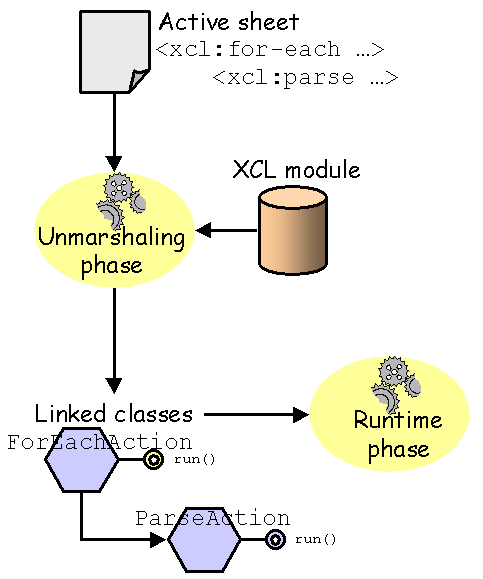
An engine that implements the specifications works in two phases :
This phase "transforms" XML tags in concrete actions that will be processed. In a certain way, tags are wrapping actions !
Once unmarshalled, an active sheet gives a processor instance. The active sheet is the serialized form of a concrete processor instance (this specification doesn't oblige an implementation to supply a mean to serialize a processor instance back to an XML document).
An action is a class designed to perform some process. An action may work alone or with subactions. Such dependency between actions is concretely represented in XML with nested tags. Actions may be :
The engine is responsible of tags unmarshalling ; that is to say that the engine chooses (or generates) the appropriate class corresponding to each tag encountered when reading the active sheet, and only the tags encountered. Each time a tag is encountered by the engine, a module request is launched with the namespace URI of the tag. If the module expected is known by the processor instance, it will deliver the concrete implementation of the action, otherwise, the internal fallback module will handle it. However, this behaviour may be tuned with EXP.
The class binding is defined within each module with a component (called a factory) responsible of the instanciation of classes that correspond to tags. However, once a tag has been unmarshalled, the corresponding class or its factory is responsible of unmarshalling its subtag :
Thus, once the engine delegates the unmarshalling process, some nested tags may not be encountered by the engine.
|
When a tag is delegated for unmarshalling, it is not necessary that other classes will be produced. There is no requirement for the number of classes to be the same of the number of elements. An engine could also generate a program code to be compiled and run on the fly. |
Tags that are unmarshalling themselves subtags must take care of the EXP specification particularly with the directives that enable/disable prefixes. See internal tuning and external tuning. |
A tag may be designed to defer the unmarshalling of its subtag only when it is invoked at runtime.
Consequently, unmarshal errors may be raised at runtime.
Each class bound to a tag is responsible of the tag's attributes interpretation. Attributes may contains values that are resolved at runtime, or litteral values. A value resolved at runtime must be an expression, that is to say a mixed-string of simple strings and XPath expressions surrounded by curly braces. Simple strings are strings that doesn't contain curly braces, or that escapes { and } with {{ and }}. When the expression doesn't contain curly braces, the string is used like a litteral value. When the expression contains a single XPath expression surrounded by curly braces, the expression may return an object at runtime. Any individual XPath expression may return any object. If an expression is composed with at least one simple string, the whole result is generally a string that contains the concateneted string values ; however, each part could also be considered separately if needed.
For example -as specified in the relevant specification- with the <xcl:parse> action :
<xcl:parse source="{$file}" ignore-comments="yes">
When an expression is found in the document content (that is to say in text nodes), it is taken in charge by the internal fallback module to produce an object at runtime.
A void expression ({}) or an expression that contains a single XPath expression filled with blanks ({ }) returns nothing.
XPath expressions always appear in expressions.
When an expression is a single XPath expression surrounded by curly braces, it is often used to deliver an object reference other than XPath native object types. A tag that uses attributes with expressions should declare which types of object it is able to deal with.
Moreover, a typed object may be compared with another compatible typed object regardless the standard XPath comparison algorithm.
Notice that some non-XML objects (called cross-operable objects) may be traversed with an XPath expression made of several steps ; unusual XPath expressions can be used, and unusual XPath results can be obtained ; for example :
In XSLT, XPath expressions that involve an attribute are used to retrieve their string value directly. In , XPath expressions are keeping the entire object ; its value may be retrieved with the value() function. An attribute value is also retrievable with the standard XPath string() function.
A tag is used to accomplish a specific task; for this purpose, it may use attributes or subtags, that are constraint by usage rules.
These assertions may be expressed within the module that maps the tag with its class. However, an may be advantageously used for this purpose because it can be used for validation only on elements that are unmarshalled.
Usually, a tag that works with subtags will invoke the standard unmarshal process. That will allow other tags from other modules to be nested. If a tag works exclusively with other tags from the same module, it may bypass the standard unmarshal process. However, this strategy shouldn't be choosen to ensure that right tags are used ; using a schema instead that constraints the tags of the module is a better strategy.
When a schema is used to check the validity, only tags that are unmarshalled by the engine are checked. It is the user responsability to validate subtags that are unmarshalled by delegation. This could be done directly by the implementation or by invoking the schema used by the module.
When unmarshalling, a component of the engine called a factory, is used to distribute instances of classes. Usually, theses classes are precompiled classes ; EXP is designed to define mappings between tags and classes of custom modules.
However, each module may define its own factory : instead of having a class for each tag, it may be convenient for the module designer to generate some code, compile it, and use it. For this purpose, an implementation may use a master factory to distribute module factories responsible of class distribution.
In XML, unprefixed attributes are not bound to a namespace URI ; however they are said to "belong" to their host element, even if it is bounded to a namespace URI.
A foreign attribute is an XML attribute that is bound to a namespace URI (its name uses a prefix), usually different from those of its host element. A foreign attribute is active if it is defined by a module.
In , foreign attributes are used as "directives" when unmarshalling, that cause a module request like tags. A foreign attribute may act on the unmarshalling phase or the runtime phase. When unmarshalling, an attribute that act on the unmarshalling phase is activated before its host element. An enabled module must supply an implementation of the task to perform, for example a configuration directive that acts on the processor instance.
Foreign attributes bound to a disabled module are ignored.
As attributes are unordered within an element, foreign attributes are applied in a specific order given by a priority indicator -an integer- that their owner module must define. High values are less prior than low values. -1 is reserved for internal usage and should be not used for custom modules. Zero is reserved for version settings (@foo:version). Module designers should use values greater than zero.
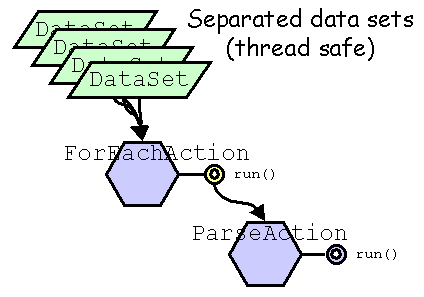
Once an active sheet has been unmarshalled, a complete processor instance is ready to use. A data structure, called the data set, is used to store properties when performing the process. As several data set may be submited simultaneously, the built process must be a reentrant process. If the engine is hosted by an application, it is responsible of the data sets initialization and submission. If not specified, properties stored in a data set are not accessible by other threads.
The data model is described later in this specification.
At runtime, an action may work with special datas : the context that may be used by its subactions, and the current object that may be used by its following actions.
Many actions are producing a main object to put in the data set ; such actions often use the @name attribute. A quick and short usage of such object may be expected ; for this purpose, instead of storing such object, it may be convenient to refer to it as the current object. Thus, instead of naming the object produced, some actions may also work in an "anonymous mode", that cause the setting of the current object to those produced by the action.
The current object may also be stored with a name in the data set. When a current object is set, the preceding current object is lost if not stored in the data set with a name. However, actions that nests subactions may save the current object and restore it after their execution. Each action should be clearly documented if they allow this behaviour.
Any relative XPath expression starts from the current object.
XPath expressions may be expressed indifferently from a specific object, or from the current one. If the current object is $foo, then {$foo/@bar} and {@bar} will return the same result.
The current object may also be retrieved with the current() function. If the current object is $bar and is the string "bar", then {$foo/@bar=$bar} and {$foo/@bar=current()} will return the same result.
In the examples above, the current object is also stored with a name in the data set, but this is not required. Thus, an object may be referred only as the current object.
A context is a stackable structure that an action may initialize and consume after its subactions have been performed ; some subaction may feed the context with a data that will be consumed later. The context must preserve the order of the datas it receives.
Any action may be designed to :
The context may be retrieved with the context() function.
Many actions need to refer to a common data to achieve a specific action ; for example :
| A context parameter | |
|---|---|
<xcl:transform name="htmlResult" source="{$xmlFile}" stylesheet="{$htmlXslt}">
    <xcl:if test="{$web:request/page}">
        <xcl:then>
            <xcl:param name="page" value="{$web:request/page}"/>
        </xcl:then>
    </xcl:if>
</xcl:transform>
This snippet code shows an action that performs an XSLT transformation. It is possible to pass parameters to the stylesheet because the relevant action has defined a context for it, that is fed with the <xcl:param> action. The XSLT transformation will be performed after the execution of its nested actions. | |
Special purpose context could also be defined by modules themselves. This is the case of the XCL module that defines a special context for operations.
A context is created on behalf of the action that needs it and its subactions that feeds it with datas. An action that push a new context must pop the context it has already pushed after its execution. The data set must define a stackable structure used as the context for actions that need one. Popping a context from the stack is the responsability of the action that creates it.
If the main logic procedure of an active sheet is invoked and the root element is not bound to an action, the context will be used to set the value of the current object.
An action that uses the datas of a context is free to accept or reject silently inappropriate datas. Usually, the datas that feed a context are of the same type, but inappropriate datas must never cause a crash.
An action could open successively several contexts. If so, this must be resolved when unmarshalling ; what causes the contexts separation must be clearly defined in the action.
A bubble message is a special data used to feed the context on behalf of a specific target. When the action that opens the context is not targeted by the bubble message, it must feed the upper context with the bubble message.
According to the action that opens the last context, non bubble messages may be ignored or transmitted.
An action that deals with contexts must clearly define its behaviour regarding to non-bubble messages. It is recommended for such actions to transmit the datas not used to the upper level ; however, an action could act like a "context absorber" that blocks irrelevant datas.
considers that an active tag that contains a set of declarations (declarative oriented subelements) will choose those to invoke (maybe none, maybe all) in an order that is not necessary sequential. On the contrary, imperative tags will be invoked sequentially.
uses a powerfull mechanism that allow related declarations to be assembled at runtime rather than statically, which increases dramatically the expressive capacity of declarative-oriented grammars. The dynamic assembly of declarations is very usefull when the declarative model reaches its limits, for example when switching from one declaration to another needs more complex considerations of the context than those allowed.
With declarative oriented actions, a third phase engine may be considered in addition to the unmarshal and the runtime phases. This phase may be considered as a subphase of the runtime phase.
Declarative actions are usually defined on behalf of a master component that use them in a specific way, not necessary sequentially like procedure-oriented actions. The activation of a declaration is totally arbitrary ; it depends on what its master component is intend for, and various invokation mechanisms may be designed. As such declarations can be mixed with procedural-oriented actions, it is necessary to describe how the engine can deal with them.
At runtime, a master component that uses declarative oriented actions will process them in two step :
A master component that uses declarative oriented actions may be itself a declarative oriented action ; however, this mechanism is not limited to declarative oriented actions, and can behalf to any active tag that defines entirely or partially a dynamic content model.
When feeding the context, a declarative action may also run subactions if necessary ; its activation by the master component generally consist on invoking the underlying object with a specific method, not on running it ; but it could. Additionally, invoking a declarative action may also cause its subactions running. This two activation mechanisms are not necessary related.
The definition of any active tag must indicate whether its content is static or if it can be dynamic. When the content of an active tag is specified as static, it may be assembled when unmarshalling, whereas when the content of an active tag is specified as dynamic, it must be assembled at runtime. A mixed content may be partially assembled when unmarshalling and partially assembled at runtime.
As a static action can be assembled when unmarshalling, its usage can be enforced in a schema ; on the contrary, allowing dynamic actions is much more loose regarding the constraints expressible in a schema ; at runtime, unexpected declarative actions should be reported as warnings and ignored by the host action.
A module must define the content of each of its active tags in terms of assembly, specifying for each of its subtags if it is static or dynamic. This consideration leads to definitions very different that schema technologies do.
| Impact of dynamicity on schemata | |||
|---|---|---|---|
For example, the <xcl:if> element is composed of 2 elements, <xcl:then> and <xcl:else> (which is optional) in this order, which can be expressed by the following snippet DTD : <!ELEMENT xcl:if (xcl:then, xcl:else? )> On the opposite, the <xcl:transform> element is composed of 2 optional and repeatable declarative elements, <xcl:param> and <xcl:fallback>, but the former is dynamic while the latter is static, which is at best expressible with this DTD declaration : <!ELEMENT xcl:transform ANY> In this last case, the constraints are enforced at runtime. Both snippet code below are correct regarding the DTD constraints and the constraints :
...which are producing the same result. | |||
Errors may occur :
A fatal error denotes a non recoverable error that cause the processor instance in use stopping. Recoverable errors must not cause the processor instance in use stopping.
If the processor instance in use is running inside another processor instance, the fatal error must not corrupt the host processor.
When the unmarshalling process can't be performed without loosing actions, a fatal error occurs. This may happened :
If the processor in fault is invoked from another processor (for example with EXP), the host processor must go on as explained in the next section.
Constraints expressed in a schema should be used to check the validity. When a constraint violation is encountered, an error or a fatal error occurs. The unmarshall process must go on to report other errors.
Some errors may be recovered when unmarshalling, for example by endorsing a default value when one is missing, or by providing a default action. This behaviour is module dependant, and must be described by the relevant specification.
An error is identified thanks to a qualified name. Errors occurring at runtime are classified in 3 families :
In all this cases, a fallback process may be defined by the user, and invoked automatically when needed. After invoking a fallback process, the caller may abort or go on according to the fallback process definition.
Each action may define one or several fallback processes. The fallback processes of an action must be identified with a qualified name which denotes which kind of error it is able to process. A default fallback process that has no identifier may also be defined ; it will be used for all error not matched by the identified fallback processes.
A fallback process may define itself a fallback process.
Fallback processes are always static declarations.
To achieve this, XCL provides the <xcl:fallback> element.
A module is a set of XML features grouped together. allow users to define their own module. This chapter describes how the processor must invoke them when it handles an active sheet.
To use a module, the active sheet must use a namespace declaration. XML elements and attributes, and additionnaly XPath functions and qualified names of properties used in expressions or in attribute values, that use the same prefix as the namespace declaration in its scope, cause a module request.
As the namespace declarations of the XML source document are passive, a module is automatically loaded only on module request. Once loaded, a module can't be discarded. A module is expected when one of the following XML material cause a module request as indicated :
A processor instance must hold the list of modules it knows. The best way for this purpose is to supply a catalog, such as an . EXP provides a mechanism that allows to define additional modules. As a namespace declaration is not necessary related to a module, any XML material whose namespace is not related to a module is called an unbound material.
Within an active sheet, tags, foreign attributes, XPath functions, and predefined properties are belonging to a module when their name is bound to its namespace URI. As unprefixed names of properties and XPath functions are not bound to a namespace URI, users must define a prefix if they want to use such XPath functions or predefined properties (like for foreign attributes that, by definitions, have a prefixed name). At runtime, a property bound to the namespace URI of a module won't cause an error if it is not a predefined property : it is processed like any other property.
For example, the namespace URI for the XML Control Language is http://www.inria.fr/xml/active-tags/xcl.
Any tag, XPath function, or property name bound to this namespace URI is part of the XCL module.
The namespace URI http://www.inria.fr/xml/active-tags/sys allows to use a module that provides system interactions.
With this module, environment variables are accessible through a predefined property.
The following example uses this two modules.
| Module requests | |
|---|---|
<?xml version="1.0" encoding="iso-8859-1"?>
| |
An engine that implements the specifications must provide a lookup mechanism that allows modules to be registered and automatically loaded when necessary :
Once a module is loaded, it is capable on engine request to distribute class instances or to resolve property invokations.
An engine must be implemented with at least the following core modules :
It is encouraged that common extension modules are pre-registered to the engine, so that many features will be available as they are used. See an example of modules accessible through a catalog.
Custom modules that are not pre-registered to the engine may be specifically added with EXP (See the @use-catalog attribute of the <exp:processor> element). A module can be loaded only if it has been previously registered to the engine, or if the engine has means to retrieve the module.
is the default lookup mechanism for common extension modules and custom modules. A processor instance handles its catalog list that is processed each time a new module is expected. According to the specification, the catalog entry is the namespace URI of the module, and its selector is the qualified name exp:module bound to the namespace URI : http://www.inria.fr/xml/active-tags/exp.
Implementations are free to use another lookup mechanism for bootstrapping when loading any of the core modules.
The internal fallback module is used to produce an XML tree at runtime, like XSLT does. However, unlike XSLT, several XML trees may be produced and each are still updatable after creation.
Tags that are a feature of a module are active tags. An action is the program that accomplishes the feature.
A tag is "active" if it belongs to a module. Others cause a fallback action. An XML element bound to an action is an active tag.
Tags that are not bound to a namespace URI never belongs to a module.
Some tags and attributes have a role defined (essentially in a module), others haven't. Each tag or attribute that is active according to this specification must not be used to produce XML trees. Tags that are not unmarshalled to actions are used to produce XML trees.
At runtime, when such an element is encountered, its non blank text nodes will also feed the XML tree. The XML tree is produced in the order of the nodes encountered. Actions (like alternative or iterative processing) may influence the process flow and the XML tree production.
The internal fallback module is invoked when the nodes encountered in the active sheet are not taking in charge by a module. When unmarshalling :
When the internal fallback module is invoked at runtime, it feeds the current context with the appropriate datas, that correspond to the nodes encountered :
An element created by the fallback module keeps its attributes, except those that are active foreign attributes (active foreign attributes are activated before the element), and XML namespaces declarations that are active modules (to check if a namespace declaration is related to a module, a module request without loading is launched).
Inherited namespaces are not set as attributes to an element ; only explicit namespace declarations are set.
<xcl:namespace> allow to define a namespace declaration on behalf of an element that wouldn't keep it if it was defined with the usual xmlns attribute declaration. Similarly, <xcl:attribute> allow to define additional attributes.
When the context is popped, the XML tree produced feeds the upper context. The XCL specification defines tags that can create or feed a context, for fine-grained XML tree production.
As specified above, blank text nodes are ignored by the internal fallback module. However, users that want some of them to be active just have to insert a void expression.
In the snippet code below, the text nodes inside the <foo:bar> element are preserved.
    .../...
    <foo:bar>{}
        <foo:oof/>{}
    </foo:bar>
.../...|
Text and CDATA sections are processed separately. |
XCL also provides the <xcl:text> tag that allows to set the boundaries of non blank text nodes. |
Modules may provide a set of extended functions usable in XPath expressions. Extended functions may take in argument unusual objects, that is to say objects that are other than nodes, node-sets, numbers, booleans, and strings. Similarly, XPath functions may return any object.
An extended function is named with a qualified name ; a function name which is unprefixed is not bound to a namespace URI.
Implementors may found convenient to provide a function factory for each module.
Predefined properties are properties that are already stored in the data set, or behave as if they were already in the data set, or are properties that are designed for a specific purpose on behalf of a module. Each module may define special properties for special purpose usage. Such properties must not be used for another usage that they are intended for. Such properties may contain static content, or dynamic content like $sys:random for which a different value will be computed each time it will be invoked.
Users should handle with care predefined properties : a module may restrict access to read, create, update, rename, or delete operations if necessary. Furthermore, a predefined property may be designed to store specific types of data. Attempting to perform a forbidden operation on a property must cause no trouble. Implementations may anticipate unexpected usage by logging such events or creating a predefined property that would contain a status, for example.
When needed, an invokation to a predefined property may cause side effects, that should be specified by the module specification.
The property resolver is the module component responsible of delivering the predefined property requested in an XPath expression. A property resolver may react :
A module that defines a well known set of predefined properties should use the first resolution mode.
Implementations are free to provide a single property resolver for all predefined properties of the module, or one for each property, etc.
It is not required to serve a predefined property with a property resolver ; a predefined property may be an usual property that has a specific meaning on behalf of a module. Predefined properties that have a specific behaviour may have a property resolver, other won't.
works with a structure called a data set used to store properties. A property consists of an object identified by a qualified name.
The name of a property is a qualified name.
Property names are ruled like XML attribute names : unprefixed property names are not bound to a namespace, and prefixed property names are bound to a namespace. Thus, to use/define a property bound to a namespace, its name must be prefixed.
End users are free to use bound or unbound properties within an active sheet.
allows to handle any categories of objects ; particularly :
Each item may be itself a collection or a simple object ; in a collection, items may be heterogeneous. Specific collections (created with an action of a module) could restrict read or update operations if necessary.
There are two ways to use properties :
The data set is able to store any object (that could be a collection). Each object of the data set is named with a qualified name ; unprefixed names are not bound to a namespace URI. A property consists of the object stored and its qualified name.
The data set is also able to hold a special anonymous (unnamed) object called the current object. The data set is not responsible of setting or unsetting the current object.
As some active tags are used to produce a property within the data set, they may create the property at the end of the execution of their nested tags if they have any. An action designed to produce a property after its nested action execution may push a context to handle objects produced. Data set implementations must deal with contexts.
Several distinct data set may be used to process the same active sheet simultaneously. The active sheet may ends differently for each data set used for processing.
When an active sheet ends, the data set used may be processed by a host application (that may be an outer active sheet).
A property with a null value shouldn't be stored in the data set. If an action really needs to do so anyway, the underlying module specification must describe this. A property stored with a null value will behave like a not found property.
An action that stores properties within the data set must define a scope for each, that can be one of the following :
If not specified, an action that creates a property will use by default the local scope. If an action creates several properties, each may be stored with a specific scope.
When a property is invoked (with $foo or $bar:foo in XPath expressions), it is looked up first in the predefined property set of the module to which the property is bound, if any. If it is not the case, or if it is not found, it is looked up in the local property set, then in the global property set, and finally in the shared property set.
When a property invoked is not stored in the data set, a null value is returned. Notice that null is casting to false by the XPath engine when performing boolean operations. It is useful for testing if a property exists or not, like this :
    <xcl:if test="{ not( $foo ) }">
        <xcl:then>...</xcl:then>
    </xcl:if>
At runtime, properties with a qualified name bound to a module that are not handled by a property resolver are extracted from the data set, if they exist.
When a property is stored in the data set, it is stored with a specific scope. As scopes are following a hierarchy, a property may shadowed another property that has the same name but a lower scope.
A property defined with a lower scope than another one with the same name can't be accessible by property invokation in an XPath expression, except if a tag was specifically designed for this purpose. An implementation of an action could also perform direct access to the data set with a given scope if needed.
Objects usually expose their internal state with public members. The cross-navigation allows internal variables of so-called X-operable objects (cross-operable objects) to be accessed with an XPath expression.
X-operable objects are XML compliant thanks to a component called an X-operator. An X-operator is suitable for objects that :
The list above is just a guideline for designers ; at their convenience, any object may be exposed or not as a cross-operable objects.
An X-operator is a sort of visitor of the object it represents that is able to deliver a data when invoked with an XPath expression. An X-operator is also able to perform update operations when they are allowed. An X-operator is selected at runtime by the engine according to the type of object encountered.
For example, assume that a class Book have a title, a price, and a content ; it would be convenient to retrieve them with $theBook/title, $theBook/price, and $theBook/content, if $theBook was an instance of this class.
Like with collections, XPath expressions may be expanded to cross such objects : $coll/*[title='Hamlet']/content/document/author ; children of cross operable objects are not necessary XML nodes, they can be any object, cross-operable or not ; similarly, the value of cross operable objects attributes are not necessarily strings.
It is recommended that most objects stored in a data set are X-operable objects. To increase flexibility, modules designers are encouraged to expose the objects intended to be stored in a data set with an X-operable interface.
X-operable objects other than XML objects are not obliged to support all XPath features. An X-operable object is just used to provide accessibility to one or several of its internal variables with an XPath expression. When necessary, they may be updated with X-operations.
An X-operable object may be slightly different as usual XML objects : for example, an attribute may host another X-operable object that may have itself its attributes. An XPath expression like the following may be legal : @foo/@bar.
X-operable objects may be updatable with a set of basic operations, that can be applied on the object with various means, according to its intrinsic characteristics, the axis it supports, and specifically its eventuals attributes. Each specific X-operable object is free to support or not the primitive operations listed below.
provides a standard way to update an object when a primitive operation is relevant for one of its characteristic ; in a module, specific actions may be designed to act directly on an object characteristic that is not accessible with . For example, a directory of a file system may be exposed as a cross-operable object ; its child axis provides the list of the files it contains, but is not updatable, but an action might be designed to create a new file in this directory.
Various actions can be considered to perform any of the primitive operations.
XCL provides a full implementation of that maps precisely actions to these primitive operations.
Some operations denotes that the object referred (called the referent) is part of a collection for which order may be important, or not ; for example, XML elements are such objects. When specified, the referent may be an integer that denotes the position of the object referred within the collection it belongs. The first item in a collection is at the position 1.
Some objects may be hierarchically linked to another object that it depends, called its parent. It is itself one of its children. Some operations on such objects may require to specify explicitely the parent of the referent when it is involved, others don't need to.
When specified, an operand is needed to perform a specific operation.
If the referent computed at runtime gives nothing, the operation fails without trying to resolve other datas (parent, operand, and inner actions).
When used alone, an operation is applied when encountered at runtime.
However, a set of operations may be grouped to be committed or rollback on request. When this feature is used, the operations encountered are deferred operations.
For this purpose, XCL provides the <xcl:commit> and <xcl:rollback> actions. The <xcl:operations> action is used to define the boundaries of a set of nested operations.
A deferred operation must resolve its referent, parent and operand as soon as it is encountered. When applied, it must not resolve them again.
This facility has been introduced to ease the usage of XUpdate-like operations on XML objects when incompatible updates are encountered : for example, if the first element of a node set must be removed and the second one must be updated, the expected result won't be obtained because once the first element will be removed, the second will become the first and the third the second ; this is those that will be updated.
A set of deferred operations act like if the XML document were frozen during the updates operations that are really applied later.
If not specified, a set of deferred operations is applied automatically at the end of its execution.
Each cross-operable object must define a set of characteristics for which primitive actions (read, write, update, delete, rename) must be clearly allowed, as explained in the next chapter.
When a read operation is involved, the type of object returned and eventually its possible values must be specified.
The delete operation is significant regarding to the parent object it depends on.
The write and update operations are similar but differ slightly:
Notice that the actions provided in XCL are designed to handle single objects as well as collections such as adt:list of objects; in this case, the actions are doing the right thing by processing each object.
The update operation is exposed in a cross-operable object as a process on a single object.
This chapter introduces a template definition for any cross-operable object. The module specifications should use such a template.
In the following template, operations can be processed with many means which can be introduced by a title just above:
When a type and eventually a value is specified, it is a return value if a read operation is concerned, an argument if a function is involved, or an operand otherwise.
Two irregular axis are added to the standard XPath axis : next:: and previous::. They must not be used in XPath expressions. They only appear in cross-operable object definitions to denote that objects are chained together. They are conceptually respectively equivalent to the first following-sibling:: item and the first preceding-sibling:: item.
When not specified, the axis may be deduced from other axis that are specified, as shown below. If not specified, the self:: axis returns the cross-operable object itself.
 | Allows a read operation. |
 | Allows a write operation. |
 | Allows a rename operation. |
 | Allows an update operation. |
 | Allows a delete operation. |
The acme prefix is bound to the http://www.acme.org/boat namespace URI.
Represents an ACME's boat object.
Operation Type Value Comment xs:QName The new name of the boat. type() xs:QName acme:x-boat This type name() xs:QName The name of the boat. string() xs:string The string value of the boat is its local name. parent:: acme:shipowner The shipowner of this boat. child:: adt:list of acme:crew The crew of this boat. acme:crew A crew of this boat. As this type accept update operations on its children, an insert-before action could be considered ; in this case, the referent of such operation will be an acme:crew, the parent an acme:boat, and the operand a single acme:crew or a list of an acme:crew. Moreover, an insert-before action would really process an append action if ordering is not relevant for an acme:crew, that is to say if its position() function is not defined.next:: acme:x-boat The next boat. This irregular axis is used by other axis such as following-sibling:: if it is not explicitely defined for this object.previous:: acme:x-boat The previous boat. attribute:: adt:map of xml:attribute A fixed set of attributes (see below). @captain-age xs:nonNegativeInteger The age of the captain. xs:nonNegativeInteger Set the new age of the captain. @can-sink Indicates whether or not this boat can sink. xs:boolean true This boat can sink. false This boat can't sink. xs:boolean true Mark this boat so that it can sink. false Mark this boat so that it can't sink. @has-sunk Indicates whether or not this boat sunk. xs:boolean true This boat has sunk. false This boat hasn't sunk yet.
| Using a cross-operable object | |
|---|---|
This example shows how the cross-operable object defined by this template could be updated and accessed. <?xml version="1.0" encoding="iso-8859-1"?> It is assumed that the cross-operable object expected may be instanciated by the <acme:define-boat> element with the appropriate characteristics. The ACME module must be previously defined with EXP. Notice that <xcl:append> can deal indifferently with content nodes and attribute nodes ;* in this last case, the attribute is added or updated if it was already exist. The value of an attribute is not necessary a string. | |
The active sheet is the XML document that will be unmarshalled and executed by the processor.
As explained below, an active sheet may be purely declarative, procedural, or hybrid. Furthermore, an active sheet may also be a dynamic XML document, standalone or not, called an .
There are four types of active sheets, that is determined essentially by the root element of the XML document : if it is bound to a module, it is of the type 1 or type 2, otherwise (fallback) it is of the type 3 or type 4.
The following concepts are defined only in the scope of this specification in the aim of clarifying its understanding.
XML documents that drives programs without procedural sentences are declarative oriented processes. With such XML documents, an engine will understand the logic given by the elements, but the control won't be provided in the XML document.
Some XML configuration files are in this category ; for example, an XML catalog describes how to retrieve XML documents in a declarative way. In a certain manner, schema languages such as W3C XML Schema and Relax NG are also describing constraints in a declarative way ; the web deployment descriptor of the J2EE architecture is also in this category ; however, none of them is an application. On the other hand, and both applications and declarative oriented processes.
In most languages, the source code begins with a declarative sentence that usually names the program, followed by the list of libraries used. Although these sentences are declarative -like the declaration of the procedures, functions, or classes- the essential source code consist of a list of instructions that will be executed sequentially.
When an active sheet follows these construction, it defines a procedural oriented process.
Such documents are designed to embed here and there some snippet code that will be replaced by computed datas at runtime. Users usually get back the result document to perform some other processes. To do so, they may design another outer active sheet that will invoke the former (as shown in the examples "dynamic XML document" and "invoking" ).
s are close to "web server pages" technologies such as ASP, JSP, or PHP ; like these technologies, an could also be processed inside a Web server ; unlike these technologies, an may be processed independently of a Web server.
These documents are a variant of the type 3. However, they are not invoked from an outer active sheet, but embeds directly within them an additional logic procedure used at startup, as shown in the example below.
| A standalone dynamic XML document | |
|---|---|
<?xml version="1.0" encoding="iso-8859-1"?> When invoked, this will launched the default (anonymous) logic procedure that is defined with the <xcl:logic> element. As this procedure contains a call (<xcl:call>) to the main logic procedure (the <letter> element), the output get back will contain the expected XML tree used for PDF production. | |
In an active sheet document, the root element is non significative, except for modules that require explicitly a specific element. Thus, any root element is generally allowed.
When the root element is not bound to a module, such an element and its descendent is part of the main process flow, as describe in the next section.
When the root element is an active tag, and the main process flow is invoked, the underlying action will be performed. Otherwise, it is used for fallback and will produce an XML tree. For the root element, the XML tree will be bound to a context automatically openned. At the end of the XML tree production, it will be stored in the current property.
At the end of the runtime phase, the current property that contains the XML tree migth be retrieved by the invoker process if any, or serialized to the standard output for a standalone processor (for example).
A logic procedure is a process unit defined by a specific tag (<xcl:logic> in XCL, <web:mapping> in the Web module, etc) that sets the limites of the scope of the local properties of the data set. A logic procedure may be called with various specific actions or behaviours, according to the modules used. When called, the nested actions are dealing with a new empty set of local properties. If necessary, the caller could send parameters to the logic procedure called, that would be set in the new empty set of local properties. This can be done thanks to other nested tags, directly by the tag implementation, or both.
On the other hand, global and shared properties are still accessibles by the logic procedure called.
After invokation, the local properties set by a logic procedure are lost unless they are explicitely imported in the caller logic procedure. This could be done thanks to other nested tags, directly by the tag implementation, or both. In this cases, the module that owns the caller tag must describe how to keep return properties.
A caller tag may be designed to replace, stack, or initialize the current context and the current object.
A logic procedure is not necessarily obliged to contain procedural oriented processes, as described in the chapter about "typology".
A logic procedure is usually identified with a qualified name, but with certain modules, a unique unnamed logic procedure may also be defined ; such a logic procedure is called the default logic procedure ; it may be referenced with #default. As several modules could design a tag that defines the default logic procedure, each time such a tag is encountered when unmarshalling redefines (zaps) the default logic procedure.
The default logic procedure can be defined only when a tag is designed to define a named logic procedure and when the name is missing if it is allowed. Other logic procedures would be invoked with a mechanism that not involves a name, and can't stand as the default logic procedure.
Furthermore, an active sheet may also be itself directly an entire logic procedure, such as shown in "dynamic XML document" and "rdbms" examples ; such a logic procedure is called the main logic procedure ; it may be referenced with #main. Any active sheet has its main logic procedure, which corresponds to the root element.
The processor must maintain the list of the logic procedures available. When a tag is designed to invoke a logic procedure by its qualified name, #main and #default could be used instead unless otherwise specified.
At runtime, the processor will choose :
Notice in step 1 that #default or #main may be also explicitely specified.
Applications that embeds the processor and standalone processors may behave differently :
Additionnaly, the EXP specification defines its own invokation rules.
| Predefined properties | Extended functions |
|---|---|
| $this | current() context() ends-with() qname() value() type() |
The following general properties are not bound to a namespace, thus usable directly. They don't belong to a module. It is the user responsibility to not use these properties for another purpose that they were intending for.
Property type: xml:document $this is the XML tree of the active sheet.
$this should be used only for reading XML datas. Attempting to update this XML tree may cause irremediable dommage to the underlying processor instance. However, unreachable parts of the active sheet may be updated without causing a crash. An unreachable part of the active sheet corresponds to a tree fragment that can't be performed in any way.
The following functions are added to the standard set of XPath functions.
Notice that these functions are not bound to a namespace URI (they don't belong to a module), thus they are an extension of the usual XPath functions. As they are not belonging to a module, these functions are available without needing to declare a specific namespace URI in an active sheet.
Return: any This function returns the current object, as described previously in this specification.
Return: adt:list of any This function returns the context, as described previously in this specification.
Return: xs:boolean This function is the same as the standard XPath function starts-with(), except that it tests if a string ends with an other one.
Arguments and return values 1 xs:string The base string. 2 xs:string The string to test if it is at the end of the base string. Return xs:boolean true If the base string ends with the string to test false Otherwise. The arguments are the same as the starts-with() function.
Return: xs:QName This function computes a qualified name.
Arguments 1 xs:string The qualified name ; the namespace URI is resolved with the set of namespace declarations known by the engine ; if an NCName is given, the qualified name built won't have a namespace URI. Arguments 1 xml:element The QName of the element. Arguments 1 xml:attribute The QName of the attribute. Arguments 1 adt:item The QName of the item. Arguments 1 xs:string The namespace URI. 2 xs:string The qualified name. Arguments 1 xs:string The namespace URI. 2 xs:string The prefix. 3 xs:string The local name. This function returns a qualified name object.
A QName object is not necessary build with valid XML names. If so, an object can be safely named in XPath expressions ; otherwise, an XPath expression that requires to test the name of the object must use * and test the name or local name with a predicate.
This facility has been introduced for objects that have to deal with QNames without the restrictions inherent to XML names.
To check if a QName is built with valid characters, just try to build an element, for example, with it. If the element can't be created, then the QName object contains invalid characters.
Return: any This function returns the value of a named item or other object that has a name and a value.
Arguments 1 xml:attribute The attribute value. Arguments 1 adt:item The item value. Arguments 1 other The value of the object if it has a name and a value, or the object itself.
Return: xs:QName This function returns the type name of an object. An anonymous type has no name :-)
The name of a marker type is implementation dependant, and may return a class-name wrapped in a QName.
Arguments 1 any An object.
This chapter introduces the main modules of the technology and how they are coupled. Readers should refer to their respective specification for detailed informations.
The need of revisiting core XML technologies such as schemata () and catalogs () has been motivated by the will to design a unified set of XML technologies made for cooperation.
has been divided on several specifications, each focusing on a well-defined problematic.
This approach allow implementations of each specification decoupled from one another ; anyway, they may cooperate to accomplish a specific complex task.
For example, doesn't define schema inclusion/import mechanisms, because provide means to retrieve resources. may use custom XPath functions, but doesn't provide a mean to define them, because EXP does.
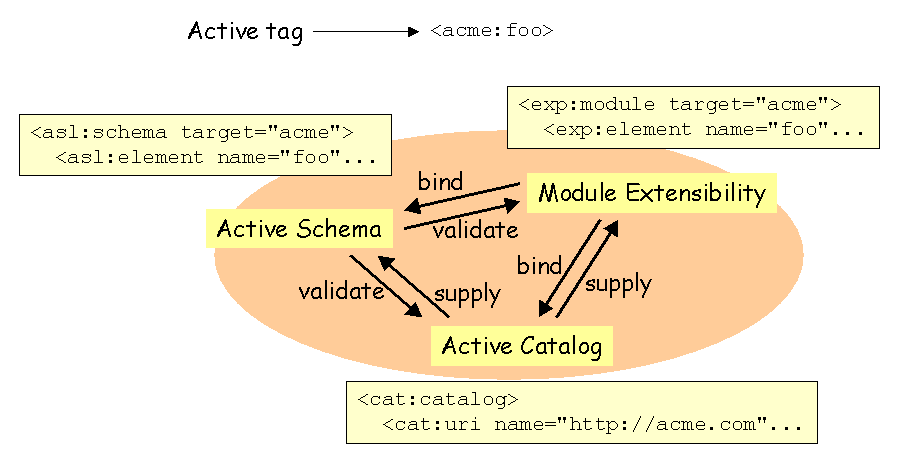
Similarly, as shown in the picture below, different module may cooperate to achieve a given task. In the aim of validating and binding an active tag to its implementation, several modules should be involved :
Moreover, the EXP module has also itself an EXP module that binds an implementation to its tags, and a schema that expresses constraints on this tags ; both resources are supplied with a catalog. Similarly, an and an are also validated by a schema, bound to classes described by the EXP module, and supplied by a catalog.
The specifications provide basic tools that users may link together at their convenience.
EXP is part of the core modules of . It provides various tags and attributes to tune the processing and build customizable processor instances.
EXP may be used to define the bindings between tags, extended XPath functions, predefined properties, foreign attributes, and their concrete implementation. Additionally, EXP offers a macro mechanism that allows to define macro tags and macro functions.
Finally, EXP may also be used for bootstrapping and offers logging facilities.
The XML Control Language is part of the core modules of . It provides various tags for general purpose processing and XML processing, like :
ASL is a powerful schema technology that allows to express more assertions expected on a document class than other schema technologies.
ASL is able to define semantic and polymorphic datatypes, can define content model dynamically, and can compute occurrence boundaries at runtime, which increases dramatically the expressiveness of the schema.
The Active Schema Language focuses on schemata problematic, which make it very light : the tag set used for designing schema instances is composed of only 20 tags. ASL can cooperate with other modules either in the aim of enhancing its possibilities, as well as for managing and assembling several schema instances.
ASL instances can be used as schema patches to legacy schemata such as DTD, Relax NG or W3C XML Schema.
revisits the XML catalog technology to respond to many requirements :
is a specification that groups several requirements related to datatypes :
This list is not exhaustive; it is a list of common modules usable by an engine that implements the specifications that implementors may use. Additional modules are welcome.
XSLT allows to perform single XML transformations ; allows to drive complete publishing processes with several entries from different sources and produce complex publications. Altough the fallback module is also designed to produce XML outputs like XSLT, also allows to update existing XML trees unlike XSLT.
Ant is a tool designed for batch processes (make files) related to Java technologies. is a specification, it is not particularly related to Java technologies. allows more flexibility in describing processes. Ant refers to properties with a proprietary addressing mode, not compatible with XPath. As relies on an XPath engine, properties addressing benefits of all the computation power of XPath.
These server side technologies are usable exclusively in a Web application with the Java technologies. may be used in a various environments and potentially many languages, both server and client side. A dynamic XML document -as described in this specification- used in a Web server, is very close to document-centric programming.
XQuery is certainly the technology the closest to , altough XQuery doesn't rely on pure XML (in the sense that the XQuery instructions are not expressed with tags).
However, allows to deal with other data sources such as RDBMS, and many non-XML data sources and objects may be accessed with XPath. Furthermore, pure declarative sentences may be mixed with oriented procedural processes with , unlike XQuery.
The usual XML data binding techniques and tools (JAXB, Castor...) are not designed to express processes cooperation. defines a generic way to mix declarative-oriented processes and procedural-centric processes. defines a tiny and smart common sharable data model.
The XML Control Language -that is part of the specifications- provides a subset of tags that covers the XUpdate working draft specification much more efficiently. The XML Control Language achieve this specification by removing ambiguities and bringing the facilities.
People that are well aware of one or more of this technologies (and others) should recognize them in , because is very close to all of these concerns. That makes easy to understand and easy to learn.
This list is not exhaustive. Additional implementations are welcome.